Jumping from place to place until we retire? Hopefully, with good pay raises? Being in a team closing Jira tickets and issues until we get bored? Based on the article, the biggest mistake is “not planning the end of our careers.” The right time to decide the end of our careers is now. The article shows three career alternatives: independent, senior individual contributor (IC), and management. Read full article
Why we don’t use a staging environment
I have lived in almost all the situations described in this post. I worked for a company where we waited months to merge from our staging branch to the production branch. Merge conflicts were a nightmare! Patches going directly to the production environment made things more complicated. Often people forgot to merge patches back to the other environments. Arrrggg!
Did I mention that we had multiple staging environments? I remember our most-senior team member advocating for ideas like the ones in this post: Getting rid of the “just-in-case” staging environment, merging and publishing everything to production, and using feature flags.
Oh, I forgot to mention the “do-not-merge-or-touch-staging” times when the Sales team was demoing the product in the same environment. The whole development team had to wait for hours…If we only had had only one environment: production…Read full article
This article might seem intimidating at first because of the Haskell syntax. But, it’s a good introduction to Sum and Product types. Custom types are useful when designing business-related entities in our domain. That’s precisely the main premise of Domain Modeling Made Functional: encode business rules, restrictions, and errors using the type system. Read full article
Maybe you should do less “work”
It contains good points about learning new things at work and making the most value of our working hours. Being efficient, developing other skills, and growing your network. Read full article
How to Quiet Your Mind Chatter
You just finished a Zoom call with one of your clients or your boss. But, you kept the conversation going in your head role-playing what you could have said differently.
We all have experienced that inner voice to imagine different endings to our conversations. Quoting the artcile, “what chatter does is take a stressful experience and prolong it… What makes stress bad is when it’s prolonged over time, and that’s what chatter really does.” The article shows two strategies to deal with chatter. Read full article
Voilà! Those are this month Monday Links. Do you have a career plan? How many environment do you have between developers’ machines and Production? Three? Do you use your work time to sharpen your skills?
If you’re learning LINQ for the first time, it can be daunting to learn all LINQ methods at once. Don’t try it.
Here are the five most common LINQ methods in pictures.
LINQ is the declarative, immutable, and lazy-evaluated way of working with collections in C#. And the most frequently used LINQ methods are Where, Select, Any, GroupBy, and FirstOrDefault.
Let’s work with a list of our favorite movies. Let’s write a Movie class with a name, release year, and a rating.
Let's keep the films with a rating greater than 4.5
We’re using arrows to display our LINQ queries. But, the output of a LINQ query is lazy-evaluated. It means the actual result of a LINQ query is evaluated until we loop through its result.
2. Select
Select applies a function to transform every element of a collection.
Let's keep only the names of our favorite filmsPhoto by Denise Jans on Unsplash
3. Any
Any checks if a collection has at least one element matching a condition. Unlike Where and Select, Any doesn’t return a new collection, but either true or false.
Let’s see if we have watched movies with a low rating.
The second parameter of GroupBy is a Func with the grouping key and the elements of each group as parameters. This Func works like a mapping function to transform each group or bucket found.
First and FirstOrDefault return the first element in a collection or the first one matching a condition. Otherwise, First throws an exception and FirstOrDefault returns the default value of the collection type.
To learn about LINQ and other methods, check my quick guide to LINQ with examples. All you need to know to start working with LINQ, in 15 minutes or less.
Want to write more expressive code for collections? Join my course, Getting Started with LINQ on Udemy and learn everything you need to know to start working productively with LINQ—in less than 2 hours.
This is an honest review of Brent Ozar’s Mastering courses after finishing them all some months ago.
I couldn’t write this a couple of years ago. Working with databases was a subject I avoided at all costs. Even to the point where I traded database-related tasks with an ex-coworker at a past job.
Avoiding database concepts cost me painful lessons.
Like the day I wrote a query with a function around a column in the WHERE and it almost took the server to its knees. That query was poorly written, and the table didn’t have good indexes. My query ended up making SQL Server scan the whole table. Arrgggg!
But, it changed a couple of years later while working with one of my clients.
They asked me to investigate the performance of some critical parts of the app. The bottleneck was in the database and I ended up Googling what to do to speed up SQL Server queries and compiling six SQL Server performance tuning tips I found.
In that search for performance tuning advice, I found Brent Ozar and his Mastering courses. These are the three things I liked after taking them.
1. Realistic Labs and Workloads
As part of Brent’s courses, we work with a copy of the StackOverflow database. Yeap, the same StackOverflow we all know and use.
After every subject in each course, we have labs to finish. Labs with bad queries, no indexes, blocking issues, etc. For the last course, Mastering Server Tuning, we have an emergency to fix. A server is on fire, and we have to put down the fire and lay out a long-term fix.
Often, some labs have easier alternatives. Either focus on a particular issue or run a workload and assess the whole situation.
2. Constraints to Solve Labs
As we progress throughout the courses, we start to have constraints to solve the labs. For example, “no index changes allowed” or “only query-level fixes.”
But, the exercise I like the most is the “Let’s play being performance consultant.” We have to fix a workload under 30 minutes with as few changes as possible. The closest thing to a real-world emergency. That’s from Mastering Server Tuning again. My favorite course.
Of course, there are more courses. They’re four in total. There’s one course solely on indexes, another one about query tuning, one to fix parameter sniffing issues, and, my favorite, the one on server-level fixes. Each course sits on top of the previous ones.
3. Popular Wisdom and Guerilla Tactics
All over the courses, Brent shares his experience as a consultant. I have those tips and pieces of advice on my notes like “when working with clients.”
For example, he shares to build as few indexes as possible and provide rollback scripts for index creation, just in case. Also, to provide a prioritized list of actionable steps to make SQL Server fast.
Also, he shares personal anecdotes. Like the day he went to consult wearing jeans, and everybody at the place was wearing jackets and ties. That story didn’t have a happy ending for the company. But, I won’t tell you more so you can find out what happened by taking the courses.
Parting Thought
Voilà! These are the three things I liked. My biggest lessons are:
Focus all tuning efforts on the top-most wait type, and,
Make as few changes as possible to take you across the finish line.
Often, we start to push buttons and turn knobs expecting SQL Server to run faster, without noticeable improvements and making more harm than good.
I will take the second lesson to other parts of my work, even outside of performance tuning context. Focus on the few changes that make the biggest impact.
I have read a couple of times about the Great Resignation. I guess the world isn’t the place after the pandemic. And that is reflected in the job market too. “A toxic corporate culture is the single best predictor of which companies suffered from high attrition in the first six months of the Great Resignation.”Read full article
What’s in a Good Error Message?
I don’t know how many times I have debugged the “The given key was not present in the dictionary” error. In fact, I wrote two C# idioms to avoid exceptions when working with dictionaries. From the article, to write better error messages: give context, show the actual error, and tell how to mitigate it. Read full article
Why don’t I have a blog?
I have always heard: “start your own blog.” Well, I started my own blog…you’re reading it. But this is a post about the opposite: why not have a blog. The author points out is that posts only rephrase Reddit or StackOverflow’s comments. But, I learned from Show Your Work that nothing is completely original. We all have some sort of inspiration. And, precisely that, and our own voice make our blogs unique. Read full article
The best advice to learn something is to learn by doing. Finding project ideas is often difficult. Another TODO app, really? This article shares a learning activity: Write a wrapper for a library or an API you’re already familiar with. Instead of jumping to the documentation, start writing a wrapper in the language you want to learn. Read full article
Career Advice Nobody Gave Me: Never Ignore a Recruiter
These days, anyone with a LinkedIn profile and “Software engineer” in the headline is getting lots of spam messages and connection requests. I bet you already got a message between these lines: “Hi X, I have one company interested in your profile. Are you available for a quick call to share more details? Please, send me your CV at this email.”
This article shares a template to reply back to these spammy messages. If you use it, you will be asking for a company name, seniority, and compensation before starting any conversation. That would be enough feedback for recruiters too. Read full article
Voilà! Another five reads! Do you answer spammy messages or connection requests on LinkedIn? Do you have a template to answer recruiters? What strategies do you use to learn new programming languages?
These days I was working with a database migration tool and ended up spending almost a day figuring out why my migration didn’t work. This is what I learned after debugging an issue for almost an entire day.
In one of my client’s projects to create or update stored procedures, we use a custom migrator tool, a wrapper on top of DbUp, “a set of .NET libraries that help you to deploy changes to different databases.” I’ve already written about Simple.Migrator, a similar tool.
To avoid updating the wrong version of a stored procedure, we rely on checksums. Before updating a stored procedure, we calculate the checksum of the existing stored procedure using a command-line tool.
How to find object definitions in SQL Server?
By the way… To find the text of a stored procedure in SQL Server, use the OBJECT_DEFINITION() function with the object id of the stored procedure.
To upgrade the database, the migrator compares the checksums of objects in the database with the checksums in header comments. If they’re different, the migrator displays a warning message and “fails fast.”
Here comes the funny part. When I ran the migrator on my local machine, it always reported a difference. Even when I was grabbing the checksum from the migrator tool itself. Arrggg!
After debugging for a while and isolating the problem I found something. On the previous script for the same stored procedure, I started the script with CREATE OR ALTER PROC. There’s nothing wrong with that.
But there’s a difference in the object definitions of a stored procedure created with CREATE and with CREATE OR ALTER.
CREATE PROC vs CREATE OR ALTER PROC
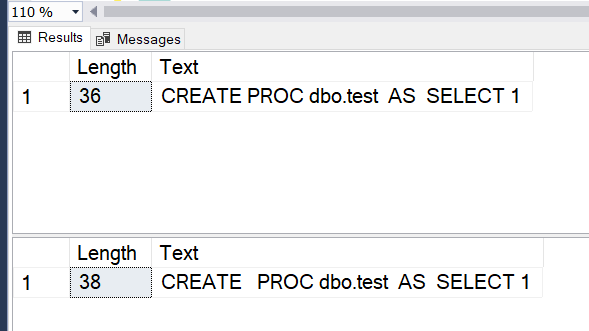
Let me show you an example. Let’s create the same stored procedure with CREATE and CREATE OR ALTER to see its object definition.
/* With just CREATE */CREATEPROCdbo.testASSELECT1GOSELECTLEN(OBJECT_DEFINITION(OBJECT_ID('dbo.Test')))ASLength,OBJECT_DEFINITION(OBJECT_ID('dbo.Test'))ASTextGO/* What about CREATE OR ALTER? */CREATEORALTERPROCdbo.testASSELECT1GOSELECTLEN(OBJECT_DEFINITION(OBJECT_ID('dbo.Test')))ASLength,OBJECT_DEFINITION(OBJECT_ID('dbo.Test'))ASTextGO
Here’s the output.
Object definition of a stored procedure with CREATE and CREATE OR ALTER
Let’s notice the length of the two object definitions. They’re different! Some spaces were making my life harder. Arrrggg!
The migrator compared checksums of the object definition from the database and the one in the header comment. They were different in some spaces. Spaces!
I made the mistake of writing CREATE OR ALTER on a previous migration, and the migrator didn’t take into account spaces in object names before creating checksums. I had to rewrite the previous script to use ALTER and recreate the checksums.
Parting thoughts
But, what’s in this story for you? We should create processes to prevent mistakes in the first place. For example:
scripts to install the right tools and dependencies to run a project
up to date documentation for internal tools
I hope you got the idea. It should be hard to make stupid mistakes.
Often, code reviews aren’t enough to enforce conventions and prevent mistakes. We’re humans and we all make mistakes. And, the more code someone reviews in a session, the more tired he will get. And, the more reviewers we add, the less effective the process gets.
Voilà! That’s what I learned these days: read object definitions from SQL Server, polish my debugging skills, and build processes around our everyday development practice.